JSON Syntax Error Checker: Why Won’t Your JSON Parse?
You paste an API response or config file into your code, run it, and get a cryptic “Unexpected token” error with no clear indication of where the problem actually is. Nine times out of ten it’s one small thing — a trailing comma, a missing quote, an extra bracket. ToolFlexy’s free JSON syntax error checker finds that exact problem instantly, pointing to the exact line, right in your browser.
This guide covers the most common JSON syntax errors, how to catch them before they break your code, and how to format and validate JSON without uploading anything to a server.
What Is a JSON Syntax Error Checker?
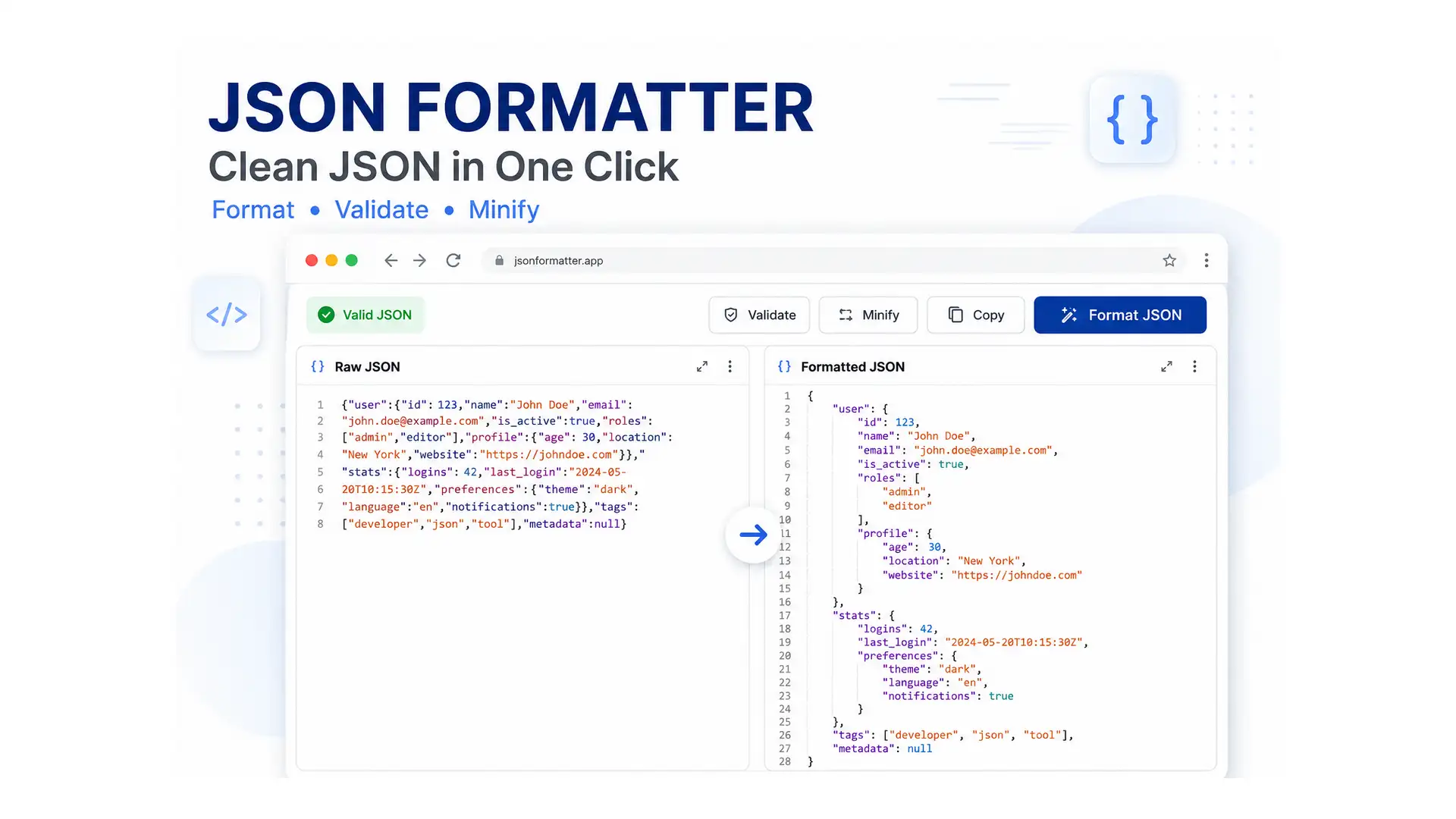
A JSON syntax error checker is a tool that parses JSON text and reports exactly what’s structurally wrong with it — an invalid key-value pair, a missing comma, mismatched brackets — instead of leaving you to scan hundreds of lines by eye. It’s effectively a combined JSON validator and JSON formatter: ToolFlexy’s checker validates your JSON instantly and points to the exact line where the problem occurs, so you’re not guessing.
How to Check and Fix JSON Syntax Errors
- Paste your JSON. There’s no practical size limit — from a small snippet to a large nested API response.
- Let the checker validate it. Syntax errors, missing trailing commas, and invalid key-value formats are detected instantly with line pointers showing exactly where the problem is.
- Fix the flagged line, then format. Once your JSON is valid, choose 2-space, 4-space, or tab indentation to make it readable, or switch to Tree View to explore nested objects and arrays visually.
- Copy or download the result. Copy the formatted JSON to your clipboard, or download it as a .json file.
Common JSON Syntax Errors
| Error | Example | Fix |
|---|---|---|
| Trailing comma | {“a”: 1, “b”: 2,} | Remove the comma after the last value |
| Missing quotes on a key | {name: “Ali”} | Wrap every key in double quotes: {“name”: “Ali”} |
| Single quotes instead of double | {‘name’: ‘Ali’} | JSON requires double quotes, not single |
| Mismatched brackets | {“a”: [1, 2, 3} | Make sure every [ has a matching ] and every { has a matching } |
| Unescaped special characters | {“note”: “She said “hi””} | Escape inner quotes: \”She said \\\”hi\\\”\” |
Formatting, Minifying, and Validating JSON
Formatting (Beautify JSON)
Converts messy, single-line JSON into readable, indented code — choose 2 spaces, 4 spaces, or tabs to match your project’s coding standards. This is the core job of any JSON formatter: turning a dense, unreadable blob into something you can actually scan.
Minifying (Minify JSON)
Compresses JSON by removing unnecessary whitespace and line breaks, producing a lighter payload for network transmission or storage.
Tree View
Explore nested objects and arrays visually instead of scanning raw text, which is especially useful for large or deeply nested API responses.
Validate-Only Mode
Check whether JSON is syntactically valid without reformatting it — useful when you just need a quick pass/fail check.
Why Use a JSON Syntax Error Checker?
- Finds the exact problem line: No more scanning hundreds of lines manually to spot one misplaced comma.
- Saves debugging time: A clear line pointer turns a vague parser error into an instant fix.
- Handles large payloads: No practical file size limit, from small config snippets to large nested API responses.
- Private by design: Everything is processed locally in your browser — nothing you paste is sent to or stored on a server.
Who Uses a JSON Syntax Error Checker?
- Developers debugging a broken API response or config file.
- QA testers validating API payloads before reporting a bug.
- Students learning web development who need to understand why their JSON won’t parse.
- Anyone working with config files like package.json, tsconfig.json, or app settings.
Common Situations Where This Helps
- An API response fails to parse and you need to find the exact malformed part quickly.
- A config file breaks a build because of one misplaced comma or bracket.
- You’re comparing two JSON payloads and need both formatted consistently to spot differences.
- You need a compact version of a JSON file for a smaller network payload.
- You’re learning JSON and want to see nested data as a visual tree instead of raw text.
Is It Safe to Check JSON Online?
Yes — ToolFlexy’s JSON syntax error checker processes everything locally in your browser using JavaScript. Any data you paste, including sensitive API responses or config values, is never sent to or stored on a server.
Explore More Free Developer Tools on ToolFlexy
JSON validation often pairs with a couple of other quick developer tasks. A few tools worth checking out:
- Build a CSS gradient visually and copy the ready-to-use code.
- Pick exact hex or RGB colors for use in a project’s config or styles.
- Check the character count of a minified JSON string before pasting it into a field with a length limit.
According to the official JSON specification, valid JSON has strict formatting rules — no trailing commas, no single quotes, and every key must be a double-quoted string — which is exactly why a small typo that JavaScript would tolerate causes a JSON parser to fail outright.
Conclusion
A JSON parse error almost always comes down to one small structural mistake that’s tedious to find by eye. ToolFlexy’s free JSON syntax error checker points to the exact line, formats or minifies your JSON, and processes everything locally in your browser — paste, check, and fix it in seconds.