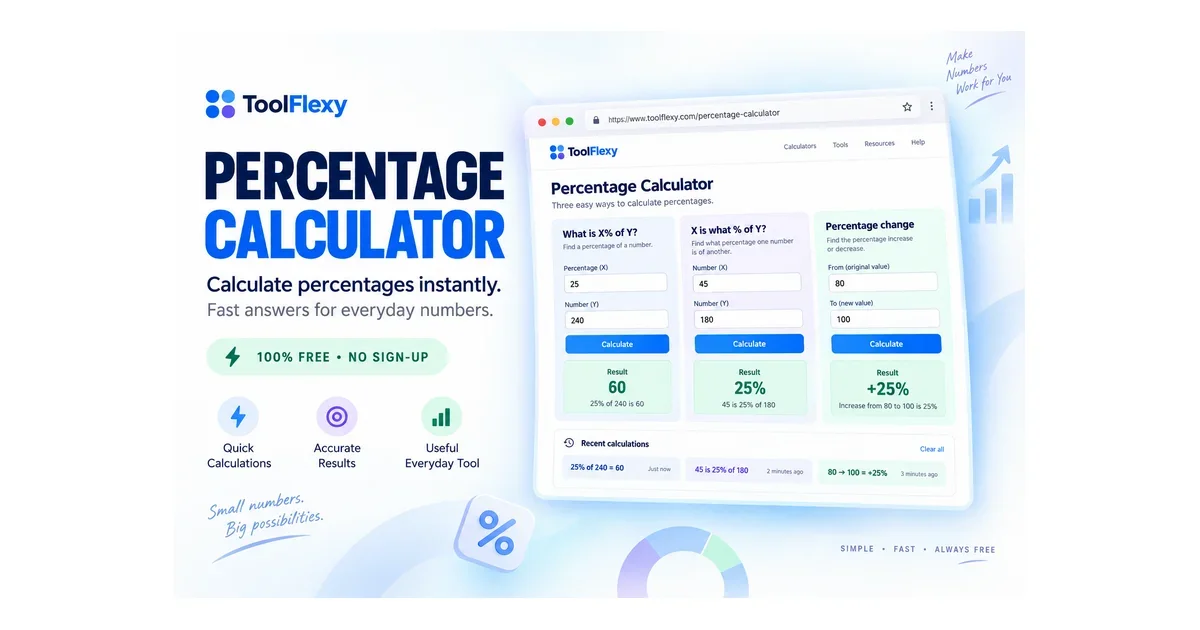
A percentage calculator is a tool that works out percentage-based math for you — finding what a percentage of a number is, what percent one number is of another, or how much something has increased or decreased — and ToolFlexy’s free Percentage Calculator covers all three in one place, calculating instantly as you type with no submit button and no sign-up.
The real confusion with percentage calculators usually isn’t the math — it’s knowing which of the three formulas actually matches what you’re trying to figure out. This guide breaks down all three, when to use each one, and answers the questions people run into most.
Try the free Percentage Calculator now — no sign-up, instant results
What Is a Percentage Calculator?
A percentage calculator is a tool that automates the three most common types of percentage math so you don’t have to remember or rearrange the formulas yourself. ToolFlexy’s Percentage Calculator handles all three modes — percentage of a number, what percent one value is of another, and percentage change — with results updating live as you type, processed entirely in your browser.
The 3 Percentage Calculations (and Which One You Actually Need)
Most percentage confusion comes down to picking the wrong one of three formulas — here’s how to tell which applies to your situation:
- “What is X% of Y?” — use this when you know a percentage and a total, and need the resulting amount (e.g., “what is 20% of 150?”).
- “X is what percent of Y?” — use this when you have two numbers and want to know what percentage one represents of the other (e.g., “30 is what percent of 200?”).
- Percentage change (increase or decrease) — use this when you have a starting value and an ending value and want to know how much it changed, as a percentage (e.g., a price going from $50 to $65).
ToolFlexy’s calculator has a dedicated input mode for each of these three, so you pick the mode that matches your situation instead of trying to remember the right formula.
| Question | Formula | Example |
|---|---|---|
| What is X% of Y? | (X ÷ 100) × Y | 20% of 150 = 30 |
| X is what percent of Y? | (X ÷ Y) × 100 | 30 is what percent of 200? = 15% |
| Percentage change from A to B | ((B − A) ÷ A) × 100 | $50 to $65 = 30% increase |
Three Worked Examples (So You Can Check Your Own Math)
Seeing the formula applied to real numbers makes it easier to trust the result — here are all three calculation types worked out step by step.
Example 1 — “What is X% of Y?” You want to know what a 15% tip is on a $42 bill. Divide 15 by 100 to get 0.15, then multiply by 42: 0.15 × 42 = $6.30. That’s your tip amount.
Example 2 — “X is what percent of Y?” You scored 42 out of 50 on a test. Divide 42 by 50 to get 0.84, then multiply by 100: 0.84 × 100 = 84%. That’s your test score as a percentage.
Example 3 — Percentage change. A product’s price went from $80 to $68. Subtract to get −$12, divide by the original $80 to get −0.15, then multiply by 100: −15%, meaning a 15% decrease.
How to Use the Percentage Calculator (Step by Step)
Here’s exactly how to get an answer using ToolFlexy’s free Percentage Calculator:
- Pick your mode. Choose “X% of Y,” “X is what % of Y,” or percentage change, based on which matches your question.
- Enter your numbers. Each mode has its own labeled input fields — no need to know the underlying formula.
- Read the result instantly. The answer updates live as you type, with no submit button to click.
- Switch modes anytime. Change between the three calculation types without reloading the page.
- Clear and start over. Reset the fields instantly for a new calculation.
How Do You Calculate a Percentage Increase or Decrease?
To calculate a percentage increase or decrease, subtract the original value from the new value, divide that difference by the original value, then multiply by 100 — a positive result is an increase, a negative result is a decrease. For example, a price moving from $50 to $65 is a $15 increase; $15 divided by $50 is 0.3, and 0.3 times 100 is a 30% increase. ToolFlexy’s percentage change mode does this calculation instantly once you enter the “from” and “to” values — you can review the underlying math in more depth on Khan Academy’s percentage word problems guide.
Common Everyday Uses for a Percentage Calculator
Percentage math shows up constantly outside of a classroom — here are the situations people use a percentage calculator for most:
- Shopping discounts — figuring out the actual price after a percentage-off sale.
- Tips and bills — calculating a specific percentage tip on a restaurant bill.
- Grades and scores — converting a raw score (like 42 out of 50) into a percentage.
- Business and finance — tracking revenue growth, price changes, or markup percentages.
- Body and health metrics — calculating percentage changes in weight, measurements, or other tracked numbers over time.
Why Do I Keep Getting the Wrong Answer?
Getting the wrong answer almost always means the wrong formula was used for the situation, not that the math itself was done incorrectly — mixing up “X% of Y” with “X is what percent of Y” is the single most common mistake, since both involve the same two numbers but ask a completely different question. Using a tool with clearly labeled, separate modes for each calculation type — rather than one generic formula box — removes this guesswork entirely.
Percentage vs. Percentage Point — What’s the Difference?
A percentage point is the simple arithmetic difference between two percentages, while a percentage change describes that difference relative to the starting value — and mixing the two up is a common source of confusion in news headlines and reports. If an interest rate moves from 5% to 8%, that’s a 3 percentage point increase, but it’s a 60% increase relative to the original 5% (3 divided by 5, times 100). Both numbers are correct; they’re just answering different questions, which is exactly the kind of mix-up a clearly labeled calculator mode helps avoid.
Explore More Free Calculator Tools
If you’re working with numbers, these ToolFlexy tools pair well with the Percentage Calculator:
- BMI Calculator — track body measurement percentages and health metrics
- Age Calculator — another quick, no-sign-up calculation tool for everyday numbers
- Word Counter — check text length stats alongside your other quick calculations
Conclusion
Percentage math trips people up far more often from picking the wrong formula than from the arithmetic itself, which is exactly why a calculator with three clearly separated modes — rather than one generic box — removes the guesswork. ToolFlexy’s free Percentage Calculator covers “X% of Y,” “X is what % of Y,” and percentage change all in one place, calculating instantly with no sign-up and full data privacy.