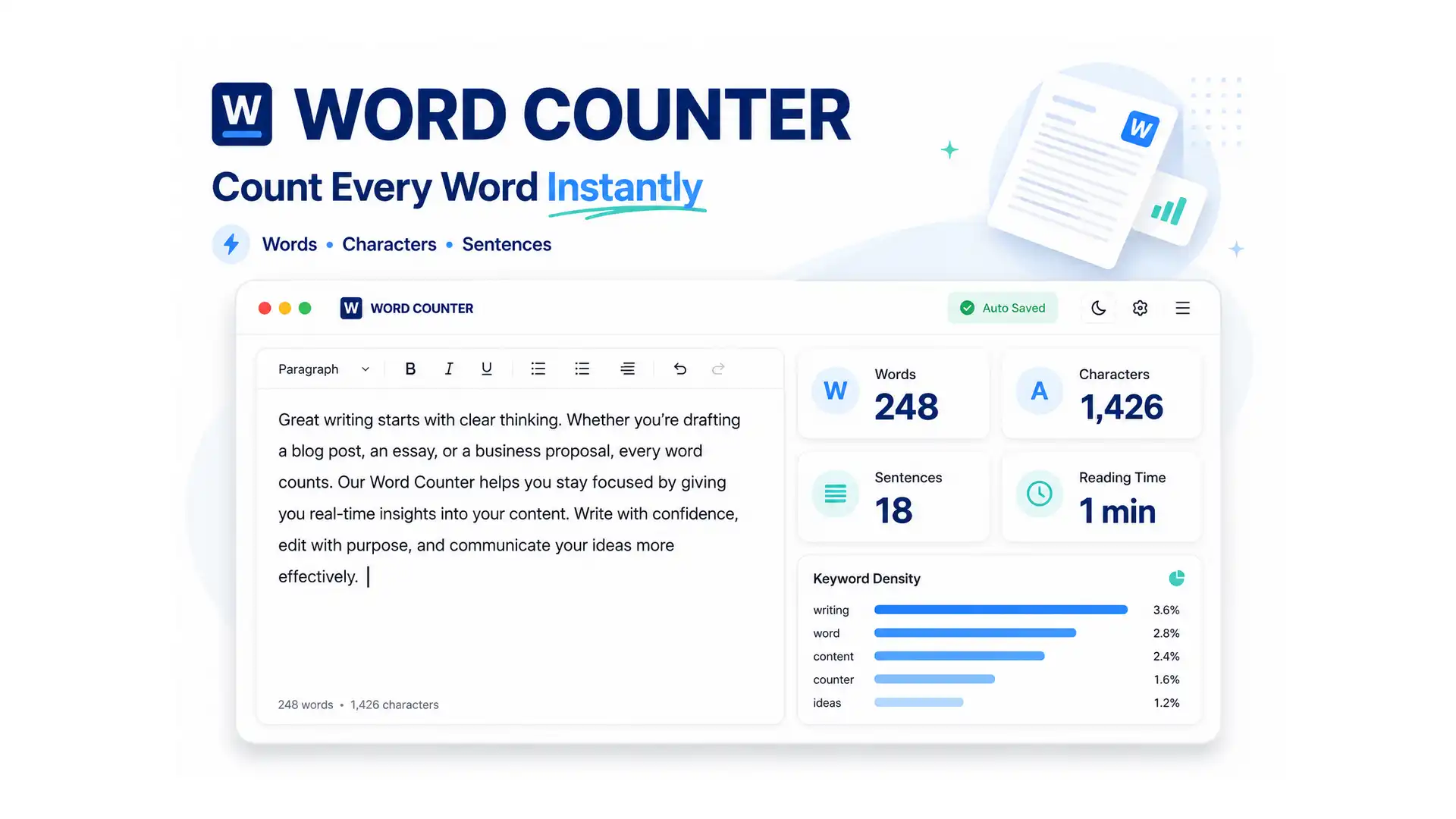
Your word count usually looks “wrong” because different tools count differently, not because anything is actually broken — Google Docs, Microsoft Word, and a browser-based counter can all report slightly different numbers for the exact same text depending on how each one handles hyphenated words, numbers, or trailing whitespace. ToolFlexy’s free Word Counter tracks 12 live stats as you type or paste — words, characters with and without spaces, sentences, paragraphs, unique words, lines, average sentence length, reading time, speaking time, a readability score, and keyword density — with no length limit and nothing sent to a server.
What Actually Changes a Word Count Between Tools
Most word counters agree on simple text, but they diverge on edge cases: whether “well-known” counts as one word or two, whether a standalone number like “42” counts as a word, and whether multiple spaces or line breaks between paragraphs get collapsed before counting. A tool that splits on hyphens will report a higher count than one that treats a hyphenated phrase as a single word, and neither answer is “wrong” — they’re just different counting rules, which is exactly why the same essay can show 998 words in one tool and 1,004 in another.
The 12 Stats ToolFlexy’s Word Counter Tracks
| Stat | What it’s for |
|---|---|
| Word count | The core count most people need for essays, articles, and captions |
| Characters (with spaces) | Matches how most platform character limits are actually measured |
| Characters (without spaces) | Useful when a limit specifically excludes spaces |
| Sentence count | Helps gauge pacing and average sentence length |
| Paragraph count | Useful for formatting checks on longer documents |
| Unique words | Flags repetitive phrasing — a low ratio to total words can mean you’re reusing the same words too often |
| Line count | Useful for scripts, code comments, or anything formatted line by line |
| Average sentence length | A quick signal for whether your sentences are running too long |
| Reading time | Estimated at your choice of reading speed (200, 238, or 300 wpm) |
| Speaking time | Estimated at your choice of speaking speed (100, 130, or 150 wpm), for scripts and presentations |
| Readability score | A Flesch Reading Ease estimate of how easy the text is to read |
| Keyword density | Your top words or 2–3 word phrases ranked by how often they appear |
All 12 update live as you type or paste into the Word Counter, and the text itself is processed entirely in your browser — nothing is transmitted to or stored on a server, so pasting an unpublished draft or a confidential document doesn’t leave your device. You can also set a target word count or a custom character limit and watch a progress bar track how close you are.
Real Limits Where an Exact Count Actually Matters
A word or character count isn’t just trivia — several real-world limits are strict enough that going one character over causes an actual rejection, not just a stylistic problem.
- X (formerly Twitter): per X’s own help documentation, posts are capped at 280 characters for standard accounts; X Premium subscribers can post up to 25,000 characters, though only other Premium subscribers may see the option to compose one that long.
- Common App college essay: the required personal statement has a hard limit of 650 words and a minimum of 250 — the submission system itself blocks anything outside that range, so checking your count before pasting it in avoids a rejected submission.
- SEO title tags: Google typically truncates a title tag around 50-60 characters on desktop search results (the actual cutoff is pixel-width based, so a title full of wide letters like “W” and “M” can truncate earlier than the character count suggests).
- SEO meta descriptions: the common practical guideline is roughly 150-160 characters before Google truncates the display, though Google doesn’t publish one official hard limit and may auto-rewrite a description anyway.
For any of these, you can plug the exact number into Word Counter’s custom character limit field instead of eyeballing it against the live count — the progress bar tells you exactly how many characters you have left, or how far over you are.
Why Reading Time Isn’t the Same as Speaking Time
Reading time and speaking time diverge because silent reading and spoken delivery happen at genuinely different speeds — adult silent reading typically runs around 200-250 words per minute, while natural spoken delivery (accounting for pauses, emphasis, and pacing) is usually slower, closer to 130 words per minute. That’s why a 1,000-word blog post might show a 4-5 minute reading time but closer to 7-8 minutes if you read the same text aloud as a script. Word Counter lets you pick your own reading and speaking speed instead of relying on one fixed average, which matters if you’re timing a presentation for a specific audience rather than estimating how long an article will take someone to skim.
Word Counter vs. Character Counter: When Each One Actually Matters
Word count and character count solve different problems, and mixing them up is one of the most common reasons a “word count” tool seems to give a confusing answer. Word count matters for anything measured in words by convention — essays, articles, scripts — while character count matters anywhere a platform or form field enforces a strict character ceiling, like a text message, a tweet, or a form’s character-limited bio field. A sentence with a lot of short words can have a high word count but a low character count, and vice versa with long technical terms, so checking the specific limit that actually applies before assuming “word count” is the relevant number saves a rewrite later.
Fixing a Word Count That Looks Too High or Too Low
If a word count looks off compared to what you expected, the most common cause is formatting that came along with pasted text — extra line breaks, leftover HTML tags from a webpage, or bullet-point markers that got counted as separate “words.” Pasting as plain text rather than rich text usually resolves this, since it strips the formatting artifacts that can inflate or deflate a count without changing the actual visible content. A big gap between your word count and your unique word count is a different signal — it usually means you’re repeating the same few words often, which is also worth checking with the tool’s keyword density view.
What a Readability Score Actually Tells You
ToolFlexy’s Word Counter uses the Flesch Reading Ease formula, which scores text from 0 to 100 based on average sentence length and word complexity — and on this scale, a higher score means easier, more accessible writing (90+ is “very easy,” roughly 5th-grade level), while a lower score means denser, harder-to-follow writing (below 30 is “very difficult,” closer to professional or academic writing). It’s a useful sanity check rather than an exact science: two paragraphs with a similar score can still feel very different to an actual reader depending on tone, structure, and subject matter, so treat it as a rough signal to revisit an overly dense paragraph rather than a target number to hit exactly. It’s also an English-language estimate — pasting text in another language still gives you a full word and character count, just no readability score.
Writers who work with tight formatting constraints tend to check both word count and readability at once — a student’s essay might technically fit inside a word limit but read as one long, hard-to-follow sentence after another, which a readability check catches even when the word count itself looks fine. Running a quick check before submitting a document, publishing a post, or sending a script to be recorded catches both problems in the same pass instead of two separate reviews.
Explore More Free Text Tools on ToolFlexy
- Case Converter — fix accidental ALL CAPS or standardize capitalization before finalizing a document.
- JSON Formatter — validate and format structured data alongside your text editing workflow.
- Website Word Counter — check word count across an entire site at once, not just one document.
Conclusion
A word count that looks “wrong” is almost always a difference in counting rules between tools, not an actual error — and for the handful of places where an exact count genuinely matters, like a 280-character post or a 650-word essay limit, checking before you submit beats finding out after. ToolFlexy’s Word Counter tracks all 12 stats live, with no sign-up and nothing leaving your browser.