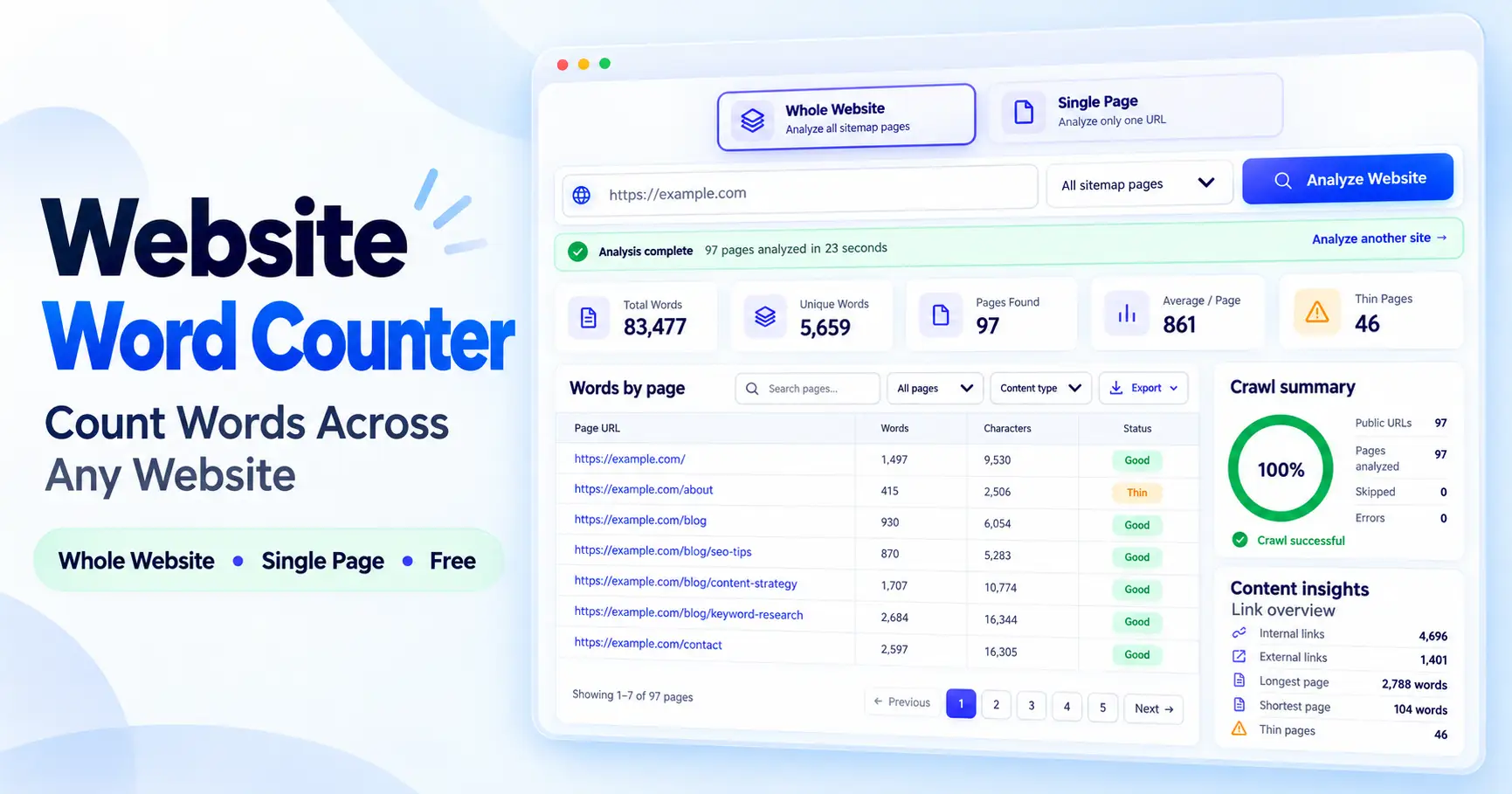
Here’s how to check word count of a website instead of one page at a time: use a tool that reads the site’s sitemap and totals the words on every public page it finds. ToolFlexy’s Website Word Counter does exactly this — switch to Whole Website mode, enter the domain, and it scans every page automatically, flags thin-content pages along the way, and lets you export the full results as CSV, Excel, PDF, or JSON, free and with no sign-up.
Why a Single-Page Word Counter Isn’t Enough
Most word counters — the kind you paste text into, or the kind that check one URL — only ever answer for one page at a time. That’s fine if you only care about a single blog post. But if you’re auditing an entire site for thin content, preparing a translation quote, or checking how a migration affected your content, checking word count in a page one URL at a time for a site with 80, 200, or 500 pages just isn’t realistic.
That’s the real difference between a page-level word counter and a website word counter: one answers “how many words are on this page,” the other answers “how many words are on this entire site, and which pages need attention.”
What “Word Count of an Entire Website” Actually Means
Checking the word count of all pages on a website means totaling the visible text across every URL the site publishes — not just one number, but a full breakdown: total words site-wide, how many of those words are unique versus repeated (menus, footers, boilerplate), the average word count per page, and which individual pages fall below a healthy word count and get flagged as thin.
A good website word count checker gives you all four of those at once, rather than making you add up individual page counts by hand.
It’s also worth knowing that a website word count checker isn’t the same thing as a full SEO audit tool. Some full-site auditing platforms include a word count as one metric buried inside a much larger (often paid) crawl report. If word count and thin-content detection is specifically what you need, a dedicated free tool built for that one job is usually faster to use and doesn’t require a paid account to see the numbers.
Who Actually Needs to Check an Entire Site’s Word Count
This isn’t just an SEO exercise. A few situations come up often enough that it’s worth knowing the fast way to do it:
- Translators and localization teams — translation is frequently priced per word, so getting an accurate total word count for an entire site before quoting a project matters more than any single page.
- SEO audits and content reviews — before a content refresh, it’s faster to scan the whole site and sort by word count than to open every page and guess which ones are thin.
- Site migrations and redesigns — comparing total word count before and after a migration is a quick way to confirm content wasn’t accidentally lost or truncated.
- Agencies reporting to clients — an exportable site-wide word count table (CSV, Excel, or PDF) is easier to hand over in a report than a list of individual page checks.
In every one of these cases, the bottleneck is the same: checking pages one at a time doesn’t scale, so the tool needs to do the crawling for you.
How to Check Word Count of a Website (Step-by-Step)
Method 1 — Use a Sitemap-Based Website Word Counter (Fastest)
The fastest way is a tool built specifically to scan a whole domain at once. ToolFlexy’s Website Word Counter reads a site’s sitemap (sitemap.xml, sitemap_index.xml, or wp-sitemap.xml) and scans every public page it lists:
- Choose Whole Website mode — use the toggle at the top of the tool to switch from Single Page to Whole Website.
- Enter the domain and set a page limit — type the site’s URL, then choose to scan all sitemap pages or set a fixed limit from 25 up to 500 pages.
- Click Analyze — the tool discovers every public page (Pages first, then Posts, then other content types) and scans each one for word count.
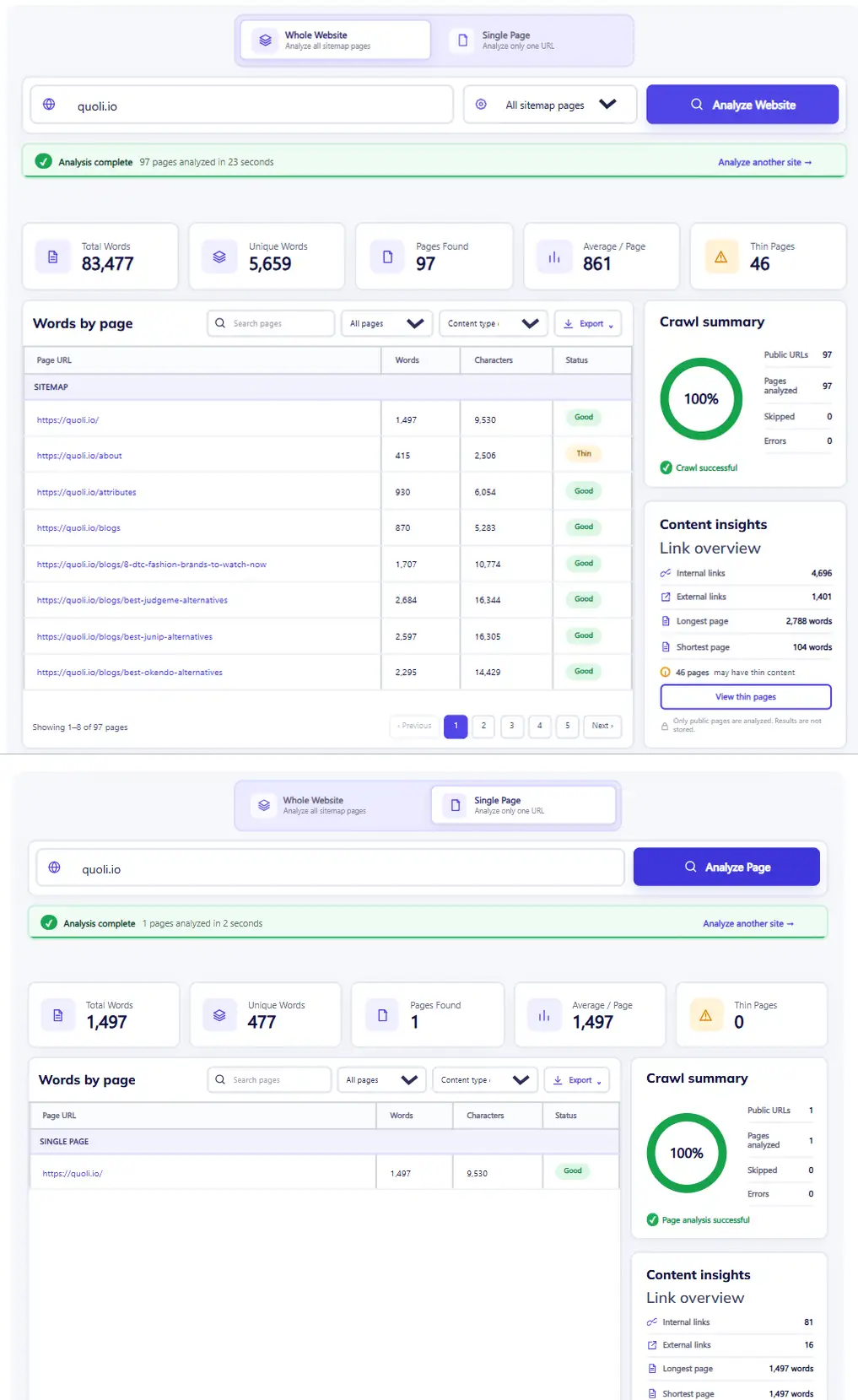
- Review the results table — see total words, unique words, and the average word count per page, with any thin-content pages automatically flagged.
- Sort, search, or export — filter by URL or word count, then export the full table as CSV, Excel, PDF, or JSON for a report or spreadsheet.
Because the scan only reads pages that are already public and nothing is stored on ToolFlexy’s servers, it’s safe to run on a client site, a competitor’s site, or your own site before a content audit.
Method 2 — Check the Word Count of a Single URL
If you only need the word count in a page for one specific URL rather than a full site scan, switch the same tool to Single Page mode, paste in the URL, and it returns the word count, character count, and link counts for that page instantly — no need to run a full sitemap scan for a one-off check.
For a deeper breakdown of one page — readability score, keyword density, reading and speaking time — paste its text directly into ToolFlexy’s Word Counter tool instead. If the number you get looks off compared to what your SEO plugin reports, the Word Count Not Adding Up guide explains exactly why different tools count differently.
Method 3 — Manual Method for Just a Handful of Pages
For two or three pages, you don’t need a sitemap scan at all — copy the visible text from each page and paste it into a page-level word counter one at a time, noting the total yourself. This works fine at a small scale, but it stops being practical the moment a site has more than a handful of pages, which is exactly the gap a sitemap-based website word count checker is built to close.
Does Word Count Affect SEO Rankings?
Word count on its own is not a direct Google ranking factor — Google has repeatedly said there’s no minimum or ideal length it rewards. What word count does correlate with is whether a page thoroughly answers the query it’s targeting: pages that are too short often haven’t covered the topic in enough depth, which is a real ranking disadvantage, but padding a page with filler words to hit a target count doesn’t help and can hurt readability.
That’s why a website word count checker is useful less as a target to hit and more as a way to spot pages that are suspiciously thin relative to the rest of the site — a signal worth investigating, not a score to game.
What Is the Ideal Word Count for a Web Page?
There’s no single ideal word count for a web page — the right length depends entirely on what the page needs to accomplish. A product or tool page answering a specific, narrow intent might only need 300-600 words to do its job well, while an in-depth guide or comparison article competing for a broad informational keyword often runs 1,500-3,000+ words because that’s what it takes to cover the topic properly.
Rather than chasing a fixed number, compare a page’s word count to what’s already ranking for that same keyword, and to the rest of your own site — a page far shorter than similar pages on your site is a more useful red flag than any fixed word count threshold.
Conclusion
Checking the word count of an entire website is a different job from checking one page — it needs a tool that can read a sitemap, scan every page it finds, and total the results, not a page-level counter used over and over by hand. Once you have that full picture, thin pages become easy to spot and word count stops being a guessing game.
Try it yourself with the free Website Word Counter tool — enter your domain, scan the whole site or just one page, and export the results in seconds.