A resume builder is a tool that lets you fill in your work history, education, and skills into a pre-designed template and download a polished, ready-to-send resume — and ToolFlexy’s free Resume Builder does it with zero sign-up, zero paywall, and zero watermark, so you can go from blank page to downloaded PDF without handing over your email first.
Most “free” resume builders online aren’t actually free — they let you build the whole thing, then lock the PDF download behind a sign-up wall or a $2.95 “trial.” This guide walks through how to build an ATS-friendly resume in minutes with a tool that’s genuinely free from start to finish, plus the questions people ask most before they start.
Try the free Resume Builder now — no sign-up, no watermark
Already built your resume? Run it through our free ATS Score Checker to see exactly how applicant tracking software will read it before you apply — or visit the Resume Studio hub to see every free resume tool in one place.
What Is a Resume Builder?
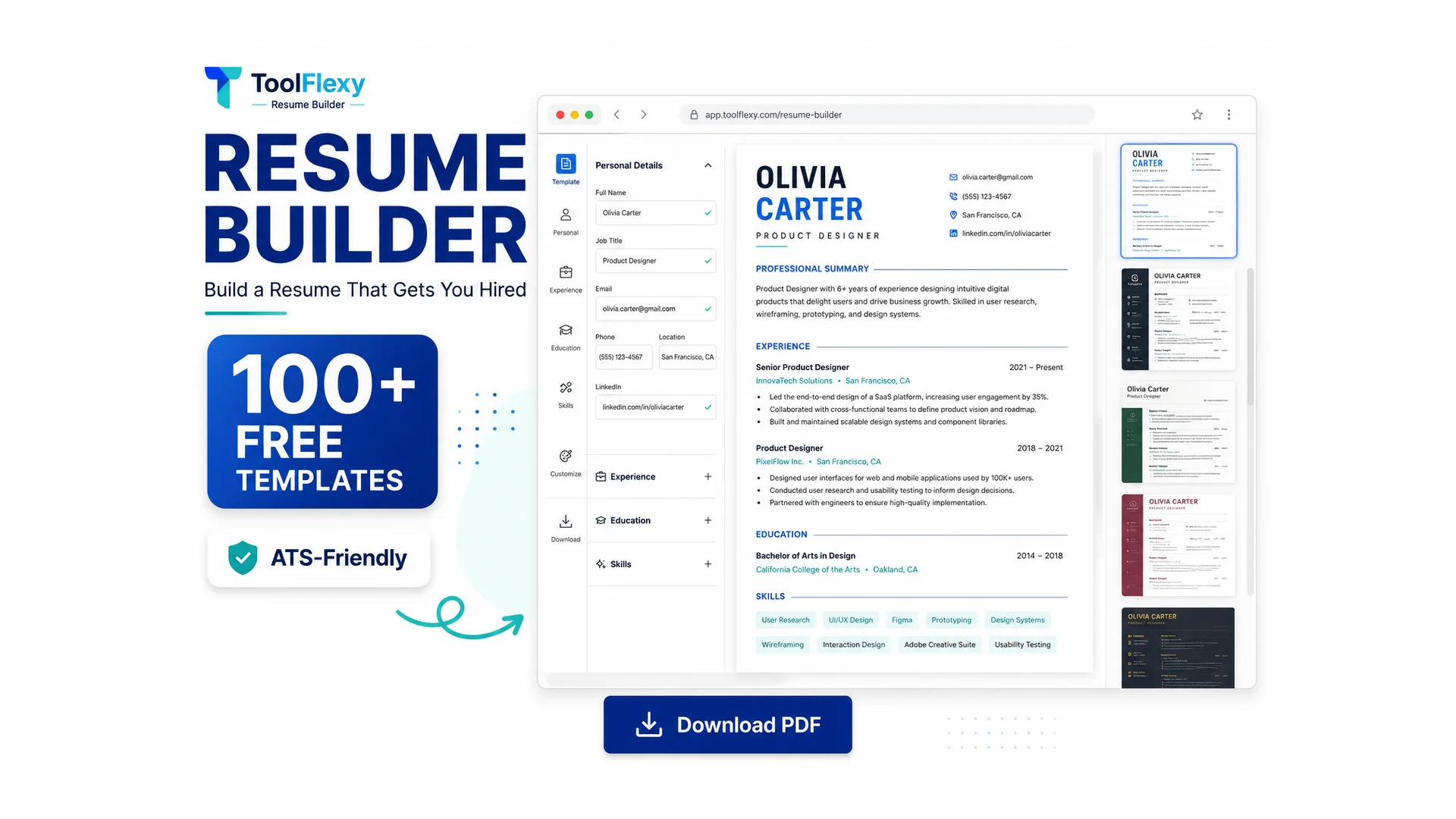
A resume builder is a tool that structures your work history, education, and skills into a professional layout automatically, so you don’t have to fight with margins and fonts in a word processor. ToolFlexy’s Resume Builder gives you 112 templates — one-column and two-column sidebar layouts, in minimal, executive, creative, and classic styles, with or without a photo — all free with no paywall on any of them.
How to Build a Resume Online for Free (Step by Step)
Here’s exactly how to build a resume with ToolFlexy’s free Resume Builder, start to finish:
- Pick a template. Choose from 112 free templates — no premium tier, no locked designs.
- Fill in your sections. Add Contact Information, a Professional Summary, Work Experience, Education, Projects, Certifications, Languages, and Skills — every section is repeatable, so you can add as many entries as you need.
- Customize the look. Adjust the accent color, font (Inter, Arial, Helvetica, Calibri, Aptos, Verdana, and others), font size, line spacing, margins, and paper size (A4 or US Letter).
- Add a photo if you want one. Choose a circle, rounded, or square shape — or skip it entirely with a no-photo layout.
- Download. Export as PDF (recommended for applications), an editable Word document, a high-resolution PNG, or plain text — no sign-up, no watermark, no download limit.
What Does “ATS-Friendly” Actually Mean?
An ATS-friendly resume is one that uses a simple, text-based structure with real headings and real bullet lists, so Applicant Tracking System software can parse and read it correctly instead of skipping over content trapped in tables, text boxes, or graphics. ToolFlexy’s templates are built this way by default — no hidden tables or design elements that scramble when an ATS scans your resume.
A resume can look beautiful to a human and still get rejected by an ATS before anyone reads it, if the underlying structure is a mess of text boxes and columns the software can’t parse. Sticking to a template with real headings and standard sections is the single biggest thing you can control here — the U.S. Department of Labor’s CareerOneStop resume-writing guide covers the same formatting fundamentals in more depth.
Is There Actually a Free Resume Builder With No Sign-Up?
Yes — a free resume builder with no sign-up does exist, and ToolFlexy’s Resume Builder is one of them: no account, no email, and no credit card at any point, including at download. This is worth checking carefully with other “free” resume builders, since many let you design the entire resume for free and only ask for sign-up or payment the moment you try to download the finished PDF — a frustrating bait-and-switch that’s extremely common in this category.
Can I Download My Resume as a Word Document, Not Just PDF?
Yes — ToolFlexy exports your resume as PDF, an editable Word document (.doc), a high-resolution PNG image, or plain text, so you can pick the format a specific job application actually requires. PDF is generally the safest default since it preserves your exact formatting everywhere, but some application portals specifically request a Word file, which is why having both options matters.
Does a Resume Builder Really Help You Get Hired?
A resume builder doesn’t guarantee a job, but it removes the formatting and structural mistakes — inconsistent fonts, ATS-breaking tables, missing sections — that get otherwise-qualified resumes filtered out before a human ever sees them. The content of your experience still matters most; the tool’s job is to make sure a good resume doesn’t get rejected for a formatting reason that has nothing to do with your qualifications.
Do I Need a Photo on My Resume?
It depends on where you’re applying — in the US, Canada, and UK, resumes are typically photo-free to avoid unconscious bias in hiring, while in much of Europe, Asia, and Latin America a photo is common and sometimes expected. ToolFlexy’s templates support both, with photo-shape options (circle, rounded, square) for regions where a photo is standard, and clean no-photo layouts for regions where it isn’t.
Resume Examples by Industry: What Changes by Role
A resume builder gives you the structure, but what goes in each section shifts depending on the job you’re targeting. Here’s what to lead with for a few common roles:
Software Engineer / Developer Resume
Put a dedicated Skills section near the top (languages, frameworks, tools) and use Projects to show real, specific work — “built a REST API handling 10k requests/day” reads stronger than a vague duty. Certifications (AWS, cloud platforms) go below experience, not above it.
Nurse / Healthcare Resume
License numbers and certifications (RN, BLS, specialty certs) usually belong near the top, right after contact information — they’re often the first thing a hiring manager or ATS filter checks. Quantify patient-care details where you can (unit size, patient ratio) rather than listing duties generically.
Teacher / Education Resume
Lead with certifications and the grade levels or subjects you’re licensed for, then list measurable outcomes (test score improvements, program results) in Work Experience rather than just “taught 5th grade.” Education goes early here, since the specific degree and licensure usually matter more than for other fields.
Customer Service / Retail Resume
Skills and soft-skill keywords (conflict resolution, POS systems, multitasking) matter more here than in most fields, since many retail and call-center ATS filters scan specifically for them. Quantify impact where possible — resolution rate, upsell numbers, customer satisfaction scores.
Recent Graduate / First Resume (No Experience)
When Work Experience is thin, Education, Projects, and relevant coursework carry more weight — move Education above Work Experience, and treat class projects, internships, and volunteer work as full entries with real bullet points, not an afterthought.
Every ToolFlexy template supports reordering sections and adding or removing them freely, so switching a layout to match one of these patterns takes seconds, not a rebuild from scratch.
Explore More Free Tools
If you’re job hunting or polishing documents, these ToolFlexy tools pair well with your resume:
- ATS Score Checker — see your resume’s ATS score and fix what’s holding it back before you apply
- Resume Studio — browse every free resume tool (builder, ATS checker, examples) in one place
- Word Counter — check your resume summary or cover letter against a word or character limit
- Case Converter — fix inconsistent capitalization in job titles or headings before you export
- QR Code Generator — add a scannable link to your portfolio or LinkedIn on a printed resume
- Invoice Generator — create a professional freelance invoice once you land the job
- Pay Stub Generator — generate a pay stub for proof-of-income needs like renting an apartment