Paste the same paragraph into two different sentence counters and you’ll often get two different numbers — not because one tool is broken, but because “what counts as a sentence” is a genuinely harder question than it looks. Use ToolFlexy’s free sentence counter online to count sentences, words, characters, and four other live stats the moment you paste your text, with no sign-up and no limit on length.
What This Free Sentence Counter Online Actually Measures
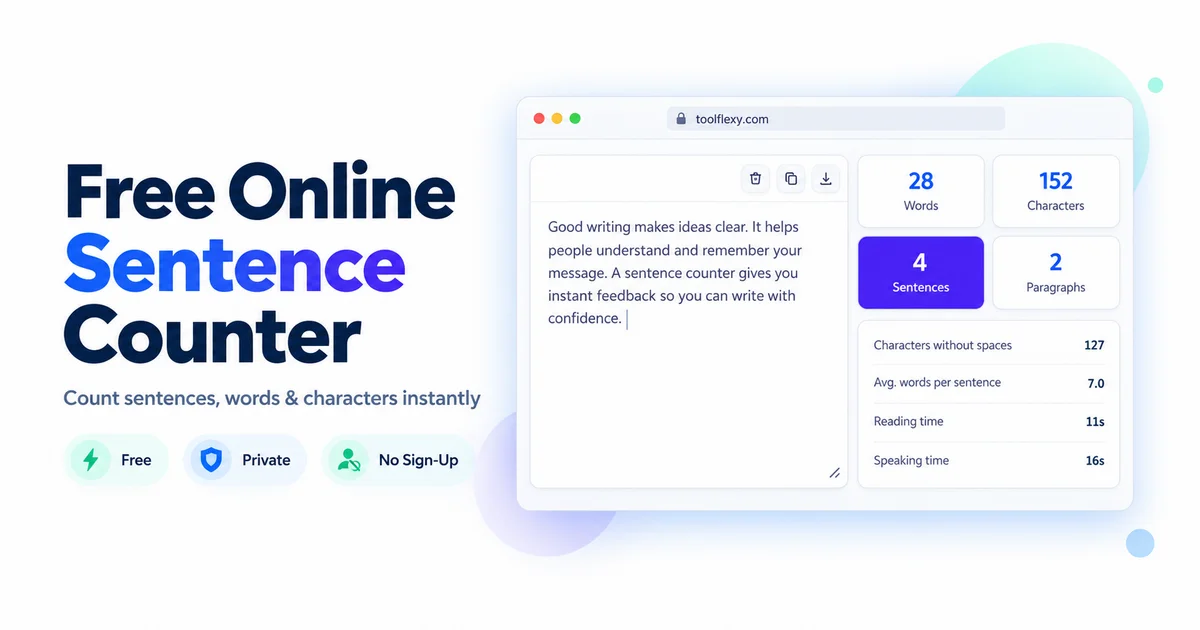
Paste or type any amount of text — a single sentence or an entire chapter — and the tool updates eight stats in real time, directly in your browser:
- Words — total word count
- Characters — total character count, spaces included
- Sentences — total sentence count
- Paragraphs — total paragraph count
- Characters without spaces — character count excluding whitespace
- Avg. words per sentence — total words divided by total sentences
- Reading time — estimated time to read the text silently
- Speaking time — estimated time to read the text aloud
Nothing you type is uploaded anywhere — the counting happens locally in your browser, so the text never leaves your device.
Why Sentence Counters Disagree With Each Other
A sentence counter has to guess where one sentence ends and the next begins, and the most common method — treating a period, question mark, or exclamation point as a sentence boundary — breaks down constantly in real writing. “Dr. Smith arrived at 3:30 p.m. and left an hour later” contains three periods that aren’t sentence endings at all (two abbreviations and a decimal-style time), which is exactly the kind of text that makes two different sentence counter tools disagree on the same paragraph.
Quotation marks compound the problem. A sentence that ends inside a quote — She said, “I’ll be there.” — has its final period tucked before a closing quotation mark, and different tools handle that positioning differently. None of this means a sentence counter is unreliable; it means the count is an estimate built on pattern-matching rules, not a guaranteed-perfect parse of English grammar, and it’s worth keeping that in mind if you’re using a sentence count for something with a strict requirement, like an academic submission.
Why Average Words Per Sentence Actually Matters
A high average words-per-sentence number is a genuine readability warning sign, not just a curiosity stat. Nielsen Norman Group’s research on readability and comprehension specifically flags long, convoluted sentences — especially compound sentences stacked with subordinate clauses and conjunctions — as a direct strain on a reader’s short-term memory, making text measurably harder to follow even when every individual word is simple.
This is why the average words-per-sentence stat is worth watching, not just the raw sentence count. Two paragraphs with the same number of sentences can read completely differently if one averages 12 words per sentence and the other averages 35 — the second forces the reader to hold far more clauses in working memory before reaching a full stop.
Reading Time vs. Speaking Time: Why They’re Different Numbers
Reading time and speaking time are calculated from two different baseline speeds, which is why the tool shows two separate numbers instead of one. Silent reading is estimated using an average adult silent-reading pace, while speaking time uses a slower average spoken-delivery pace — closer to how someone would actually read the same text aloud in a presentation or speech, pauses included.
This distinction matters most for anyone preparing something meant to be spoken rather than read: a 90-second video script and a 90-second silent read are not the same word count, and pacing a speech off the silent reading-time estimate alone tends to run noticeably long once you’re actually speaking it.
A Real Example: Same Word Count, Different Sentence Structure
Take two 40-word passages on the same topic. The first is written as eight short, direct sentences — an average of 5 words per sentence. The second covers identical content in two long, comma-heavy sentences — an average of 20 words per sentence. Both have the same word count, both take roughly the same silent reading time, but the average words-per-sentence stat immediately flags which one asks more of the reader’s working memory to parse. This is the kind of gap a plain word count alone never reveals, and it’s exactly why the sentence-level stats exist alongside the word count rather than replacing it.
The practical takeaway is that two pieces of writing can look identical on paper — same topic, same total length, same number of paragraphs — and still land very differently with a reader, purely because of how the words are broken into sentences. A writer revising a dense paragraph doesn’t need to cut content to make it easier to follow; splitting one 30-word sentence into two 15-word sentences preserves every idea while cutting the cognitive load roughly in half, which is a far faster fix than rewriting for brevity.
When You’d Actually Use a Free Sentence Counter Online
A free sentence counter online earns its place alongside a plain word counter in a handful of specific, recurring situations rather than everyday typing.
- Academic writing with a sentence-count requirement: Some assignments specify a sentence range rather than a word count, and manually counting sentences in a full essay is slow and error-prone by hand.
- Editing for scannability: Web readers skim rather than read line by line, and a paragraph made of three long sentences reads as one dense block, while the same word count split into six shorter sentences reads as noticeably easier to scan.
- Script and voiceover pacing: Anyone timing a video script or presentation benefits from the speaking-time estimate specifically, since silent reading speed consistently underestimates how long a script takes to actually deliver out loud.
- Comparing draft revisions: Running an original paragraph and its edited version through the same stats shows objectively whether an edit actually shortened average sentence length, rather than just feeling shorter.
Paragraph Count and Why It’s Tracked Alongside Sentences
Paragraph breaks do real work for a reader beyond just visual spacing — each new paragraph signals a shift in idea, and a wall of unbroken text forces a reader to hold more context in mind before finding a natural pause. This is part of the same short-term-memory strain that long sentences create, just at a larger scale: a page of five 300-word paragraphs asks more of a reader’s working memory than the same word count broken into fifteen shorter ones, even though nothing about the actual content changed. Tracking paragraph count alongside sentence count gives a fuller picture of a document’s structure than either stat alone — a text can have a reasonable average sentence length and still read as dense if it’s packed into very few, very long paragraphs.
What This Sentence Counter Doesn’t Do
This tool reports sentence structure statistics — count, average length, reading and speaking time — but it does not calculate a readability grade level or score (like a Flesch-Kincaid grade), and it doesn’t flag individual long or awkward sentences for you. If you need a numeric readability grade specifically, you’ll need a dedicated readability-scoring tool; ToolFlexy’s Sentence Counter is built for fast, accurate structural stats rather than an automated writing-quality verdict.
Explore More Free Writing Tools on ToolFlexy
- Word Counter — check word and character counts against a platform’s specific limit, like X’s 280-character cap.
- Case Converter — quickly switch text between uppercase, lowercase, and title case.
Conclusion
A free sentence counter online is more useful than a plain word count because it surfaces structure, not just length — how many sentences you’re using, how long each one runs on average, and how long the text actually takes to read or say out loud. ToolFlexy’s free sentence counter online gives you all eight stats instantly, with no sign-up and no length limit, whether you’re checking a single paragraph or an entire draft.